Third Grade Learning Games
RosiMosi LLCEducational
3.91.95K Reviews
- Version
- 7.3.1
- Installs
- 1.00M
- Age Rating
- Everyone
Screenshots

Our Review of Third Grade Learning Games
 Analysis by Appyee
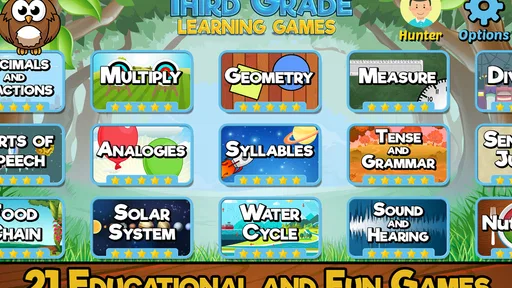
For a third grader, short learning activities can be easier to fit into the day than a long lesson, especially when attention is already running low after school. I like the idea behind Third Grade Learning Games: it turns practice into a set of bite-sized play sessions, so a child can work through school-related material without every moment feeling like another worksheet. The key question is whether that variety is useful in an ordinary home routine, and how much guidance an adult still needs to provide.
Learning through a collection of short games
This is an educational game from RosiMosi LLC, aimed at children in third grade. Its central appeal is breadth: instead of focusing on one subject or one style of exercise, it brings together activities intended to make learning feel playful. The game is free to start, is rated for Everyone, and has optional in-app purchases. I would treat it as a source of extra practice rather than a replacement for a teacher, a curriculum, or a full lesson.
Why variety matters in practice
When a child is reluctant to revisit a school topic, changing the format can make a difference. A quiz asks for a quick answer, while a puzzle or interactive challenge asks the child to approach the task differently. In my view, that mix is the most useful idea here: it can help a learner stay willing to try, even when one kind of exercise has started to feel repetitive.
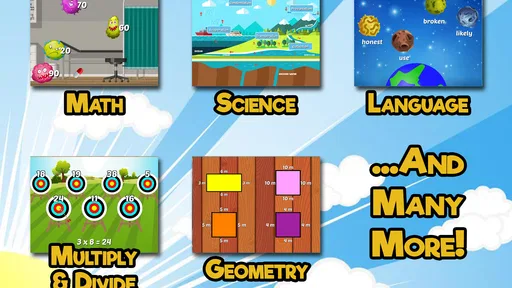
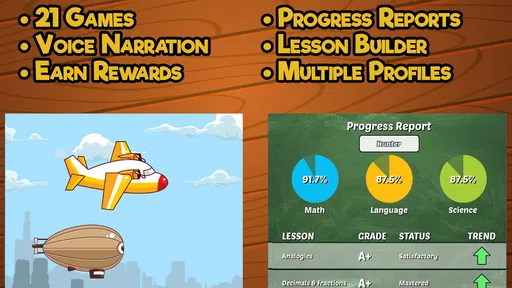
The activities cover areas such as math, reading, and science. That makes the game easier to bring out when a parent does not have time to prepare a separate activity for each subject. A child who has had enough of number practice might be more open to switching to a reading or science activity, rather than ending the session altogether. The practical benefit is not that every topic is taught in depth, but that a child has more than one route into a short learning break.
There is a useful trade-off in that breadth. A collection of varied games can make practice feel lighter, but it may not provide the sustained sequence a child needs to master a difficult concept. If my child were repeatedly getting stuck on one specific skill, I would use the game to spot where interest or confidence drops, then follow up with a focused explanation or a teacher-recommended exercise. Play can create a good opening for learning; it does not automatically fill every gap.
How I would fit it into a school day
A realistic use would be a short after-school session before dinner. I would let the child choose a subject, then sit nearby for the first few minutes—not to answer every question, but to see whether the instructions make sense and whether the activity is at a comfortable level. If the child is engaged, I would give them room to continue independently. If frustration sets in, I would pause and talk through the underlying idea instead of treating a score or a completed activity as the goal.
That small amount of adult involvement is worth planning for. A child-friendly interface may help children move around without constant assistance, but independent navigation is not the same as independent learning. A parent can ask, “What did you try when that answer didn’t work?” or invite the child to explain a science idea in their own words. Those questions turn a quick game into a chance to check understanding, without making the session feel like a test.
I would also use the different subjects as a way to manage energy. When a child is tired, start with a topic they already enjoy rather than insisting on the hardest subject first. Once they are settled, offer a more challenging activity if they seem ready. This is a simple routine, not a special feature, but it makes the collection more useful: choice can lower resistance, while a parent’s observation helps prevent an easy activity from becoming the only one the child chooses.
What to expect from progress and difficulty
The original appeal of progress tracking is that it can help an adult notice patterns instead of relying on a child’s quick “I’m done.” If the game shows a learner repeatedly doing well in one area and struggling in another, that can guide a practical conversation about what to practise next. I would use any progress information as a prompt, not as a complete picture of a child’s ability. A game captures performance during its activities; it cannot by itself explain whether a mistake came from a misunderstanding, rushing, distraction, or simply having a difficult day.
Difficulty adjustment can also be helpful when a child’s confidence varies between subjects. A level that feels manageable in one area may feel discouraging in another, so I would check the child’s reaction rather than assume one setting is right across the board. The aim is a productive stretch: enough challenge to hold attention, but not so much that the child starts guessing or avoids returning. If adjusting difficulty is available in the activity, make changes based on how the child is coping, not just on whether they finish quickly.
One useful habit is to ask the child to explain an answer before moving on. That helps distinguish genuine understanding from tapping through choices. Another is to keep sessions brief enough that the child can finish while still engaged, rather than waiting until frustration takes over. These are small choices, but they make a casual game more likely to support learning rather than serve only as screen time.
Where it sits among learning apps
Compared with a single-subject math or reading app, this game’s broader mix is more convenient when a family wants different kinds of practice in one place. The compromise is focus: a dedicated subject app may offer a more structured path for a child who needs repeated work on one particular skill. Compared with paper worksheets, game-style activities may feel more inviting to a child who resists written practice, though worksheets can be easier for an adult to tailor to a very specific classroom assignment.
It is also different from an open-ended educational video. A game asks the child to respond, make choices, or solve something, which gives an adult more opportunity to see how the child is thinking. But if the goal is a calm explanation of a new topic, a parent, teacher, or carefully chosen lesson may be a better first step. I would choose this app for supplementary practice and variety, not as the sole resource for teaching a new unit or preparing for a particular assessment.
Who is most likely to enjoy it
I can see it working best for families with a third grader who enjoys playful challenges, benefits from switching between subjects, or needs a low-pressure way to revisit school topics at home. It may also help a parent who wants a ready-made activity for a short gap in the day, provided an adult is available to help interpret how the child is doing. The app has attracted a substantial audience, with over a million installs and an average rating of 3.9 from around 8,600 ratings, though those figures are only broad context—not a guarantee that its activities will suit every learner.
I would be more cautious if a child needs a highly structured lesson sequence, specialist support, or close alignment with a particular classroom plan. In those cases, a teacher’s materials or a focused app chosen for the exact learning need will be a better fit. It may also be a poor match for a child who finds game prompts distracting or prefers to learn through conversation and hands-on activities. There is no need to make every child learn in the same way; the useful test is whether the format helps this child stay curious and practise.
Cost, age fit, and a sensible first try
The game is free, with in-app purchases listed from $4.99 to $39.99 per item. I would let a child try the free experience first and decide whether the range of activities actually fits the family’s routine before considering any purchase. Since the optional items span a broad price range, check the purchase details in the app rather than assuming every activity is included at no cost. That is especially sensible if a child will use the device independently.
It is rated Everyone and is designed around third-grade learning, but age suitability does not automatically mean every activity will match a particular child’s reading level or confidence. I would stay nearby at first, both to see how the child handles the instructions and to make sure the content feels appropriately challenging. The game’s current version is 7.3.1, and it requires iOS 8.0 or later. It first appeared on May 3, 2013, so it has been around for years; what matters most for a family is whether the current experience runs well on its device and meets the child’s needs.
Getting started without turning play into a lesson
First things first, let me tell you how easy it was to get started with Third Grade Learning Games. I downloaded it from the app store, and within minutes, my little one was ready to dive into a world of learning. The interface is super intuitive, which is a big plus. Kids can easily navigate through the various sections without needing much help, leaving us parents some well-deserved downtime.
Engaging Gameplay
Now, onto the good stuff—the gameplay! This app is packed with a variety of educational games that cover essential subjects like math, reading, and science. What I love about these games is that they are designed to be both fun and challenging. Trust me, watching your child solve a tricky math puzzle with a big grin on their face is priceless.
The app uses a mix of quizzes, puzzles, and interactive challenges to keep things exciting. The visuals are colorful and engaging, making learning feel more like a fun adventure rather than a chore. My child especially enjoyed the science games, which sparked endless questions and curiosity about the world around them.
Tracking Progress
One of the standout features of this app is its progress tracking system. As a parent, it's great to have insight into what your child is learning and how they're progressing. The app provides detailed reports on their performance, highlighting areas where they excel and where they might need a little extra help. This feature is invaluable for keeping tabs on their educational journey.
Tailored Learning Experience
Another aspect worth mentioning is the ability to customize the learning experience. The app allows you to adjust the difficulty level of the games, ensuring that your child stays challenged without feeling overwhelmed. This adaptability means the app grows with your child, making it a long-term companion in their educational journey.
My recommendation for the right kind of learner
In conclusion, Third Grade Learning Games is a fantastic educational tool that combines learning with play. It's a win-win for both kids and parents. The app's user-friendly interface, engaging content, and comprehensive progress tracking make it a top pick for anyone looking to enhance their child's learning experience.
So, if you're on the hunt for an app that will keep your third grader entertained and educated, give Third Grade Learning Games a try. You might just find yourself learning a thing or two alongside your little one!
Verdict
Strengths of Third Grade Learning Games
- Engaging and colorful graphics.
- Wide variety of educational games.
- User-friendly interface for kids.
- Offline mode available.
- Adaptive difficulty levels.
Limitations of Third Grade Learning Games
- Some games require in-app purchases.
- Ads can be distracting.
- Limited free content.
- Occasional bugs reported.
- No multiplayer option.
Other Releases by RosiMosi LLC
View All
Barnyard Games For Kids
Educational4.1

Second Grade Learning Games
Educational4.1

First Grade Learning Games
Educational4.1

Preschool & Kindergarten Games
Educational4.2
Similar Picks in This Category
View All
Little Panda Policeman
BabyBus4.0

Monster Trucks Game for Kids 2
Raz Games4.1

Little Panda's Chinese Recipes
BabyBus4.4

Little Panda's Restaurant
BabyBus4.4

Little Panda's Ice Cream Games
BabyBus4.3

Baby Panda Care
BabyBus3.8
Frequently Asked Questions
What age group is Third Grade Learning Games suitable for?
Third Grade Learning Games is specifically designed for children in the third-grade age group, typically ages 8-9. The app offers educational activities tailored to this developmental stage, focusing on enhancing skills in subjects like math, reading, and science. Parents can rest assured that the content aligns with third-grade curriculum standards.
Does the app require an internet connection to function?
While some features of Third Grade Learning Games may require an internet connection, such as downloading new content or updates, most of the games and educational activities can be played offline. This makes it convenient for use in various environments, including during travel or in areas with limited internet access.
Is Third Grade Learning Games free to download and use?
The app is free to download and provides access to a selection of games and activities. However, there may be additional content or features available through in-app purchases. Parents should be aware of these options and may want to set up password protection for purchases if allowing children to use the app independently.
How does Third Grade Learning Games ensure educational value?
Third Grade Learning Games is developed with input from educational experts and aligns with common core standards to ensure it provides real educational value. The app includes a variety of subjects such as math, reading, and science, with interactive lessons and quizzes to reinforce learning and track progress.
Is there any parental control available within the app?
Yes, Third Grade Learning Games includes parental control features. Parents can monitor their child's progress, set playtime limits, and control access to certain content. This ensures a safe and controlled environment for children to learn and play, while allowing parents to customize the experience to suit their child’s needs.
Play our best games!


